
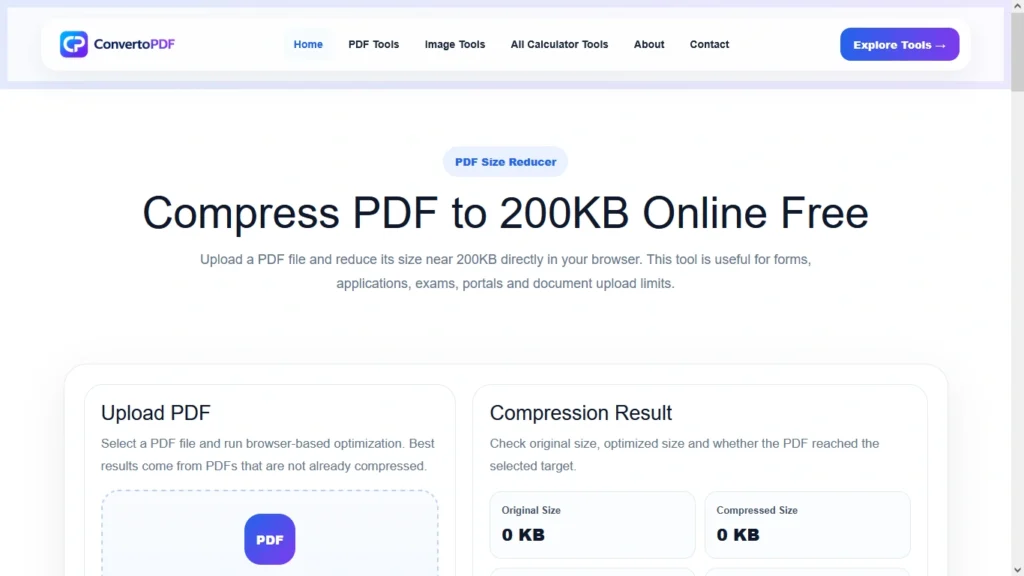
Compress PDF to 200KB Online
Need to compress a PDF to 200KB for an online application, email attachment, government form, job portal, university admission, or document upload? Our Compress PDF to 200KB tool helps you reduce PDF file size quickly while maintaining the best possible quality.
Many websites and online portals have strict file size limits, making it difficult to upload large PDF documents. Instead of installing complex software or spending time manually editing files, you can use our online PDF compression tool to reduce your PDF size to approximately 200KB in just a few clicks.
The tool is designed for speed, convenience, and simplicity. Whether you’re using a desktop computer, laptop, tablet, or smartphone, you can compress your PDF online without creating an account or downloading additional software.
Why Compress a PDF to 200KB?
PDF documents are widely used because they preserve formatting across devices and operating systems. However, PDFs often become too large due to embedded images, scanned pages, graphics, and high-resolution content.
Compressing a PDF to 200KB can help in several situations:
- Uploading documents to government portals
- Submitting job applications
- University and college admissions
- Scholarship applications
- Online examination forms
- Email attachments
- Document sharing platforms
- Business document submissions
Many portals automatically reject files that exceed their size limits. Reducing your PDF size beforehand helps avoid upload errors and saves valuable time.
Benefits of Using a PDF Compressor
Using a dedicated PDF compression tool provides several advantages over traditional editing methods.
Faster Uploads
Smaller PDF files upload significantly faster, especially when using a slow internet connection. This can be particularly useful when submitting important documents before deadlines.
Easier Sharing
Compressed PDFs are easier to send through email, messaging apps, and cloud storage services. Recipients can download and open them more quickly.
Storage Savings
Reducing PDF size helps save storage space on your computer, smartphone, or cloud account. This becomes especially important when managing hundreds of documents.
Improved Accessibility
Smaller files load faster on mobile devices and web browsers, creating a better user experience for document viewing and sharing.
How to Compress a PDF to 200KB
Compressing a PDF file is simple and requires only a few steps.
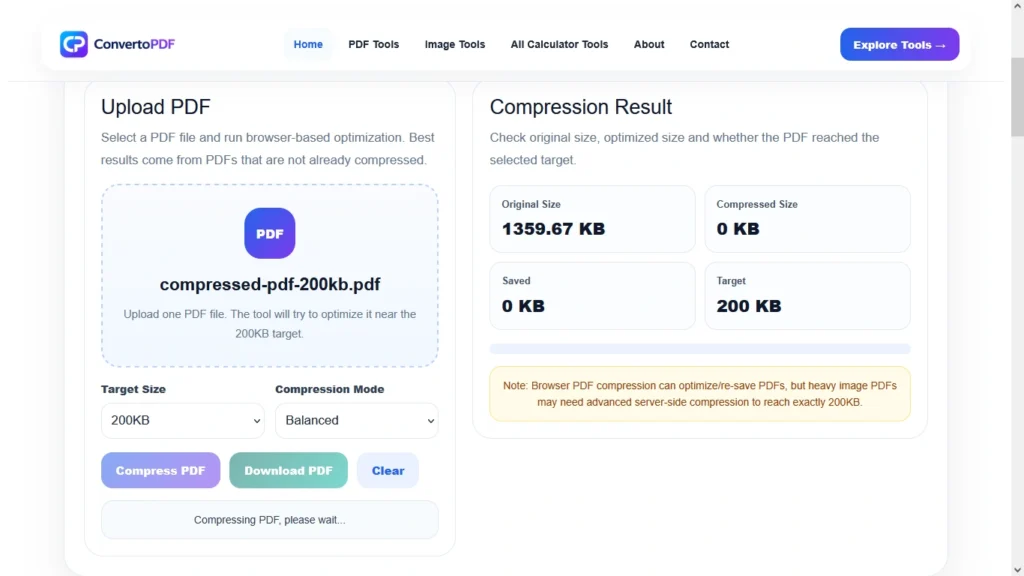
Step 1: Upload Your PDF
Select the PDF file you want to compress from your device.
Step 2: Start Compression
The tool automatically analyzes the document and applies optimization techniques to reduce file size.
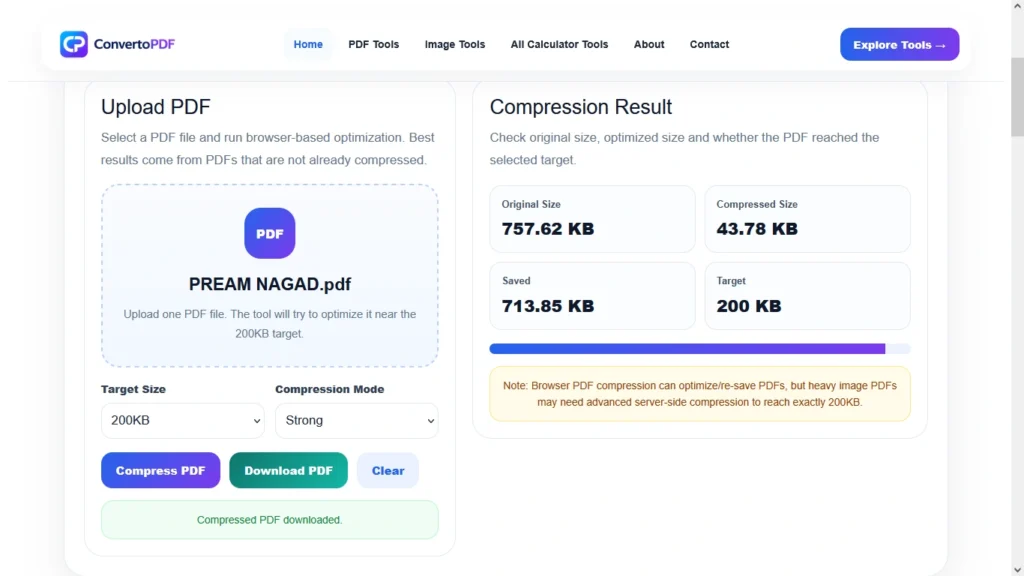
Step 3: Review the Output
Once compression is complete, review the optimized PDF to ensure that text and images remain clear.
Step 4: Download the Compressed File
Download the compressed PDF and use it for uploads, sharing, or storage.
The entire process usually takes only a few seconds depending on file size and internet speed.
Common Uses of Compress PDF to 200KB
People frequently need to reduce PDF files to meet specific upload requirements.
Government Applications
Many government websites require PDF documents below a certain size limit. Compressing files to 200KB can help meet these requirements without affecting readability.
Job Applications
Employers often request resumes, certificates, and supporting documents in PDF format. A smaller file size makes uploading faster and easier.
Educational Admissions
Universities, colleges, and educational institutions commonly ask applicants to upload mark sheets, certificates, and identity documents in PDF format.
Banking and Financial Documents
Banks and financial organizations frequently require PDF uploads during verification processes. File size restrictions are common, making PDF compression essential.
Legal Documentation
Law firms, consultants, and professionals often share contracts and agreements in PDF format. Compressing these documents simplifies transmission and storage.
Can PDF Compression Affect Quality?
This is one of the most common questions users ask.
The answer depends on the compression level and the content of the PDF. Modern compression technology is designed to reduce file size while preserving the readability of text and maintaining acceptable image quality.
For most documents, users will notice little or no visible difference after compression. However, highly scanned PDFs containing large images may experience slight reductions in image resolution.
The goal is always to achieve the best balance between file size and quality.
Features of Our Compress PDF to 200KB Tool
Our tool is designed to provide a simple and reliable user experience.
Free to Use
Users can compress PDF files without paying subscription fees.
No Registration Required
There is no need to create an account or provide personal information.
Fast Processing
Files are processed quickly, allowing users to compress documents within seconds.
Mobile Friendly
The tool works perfectly on smartphones, tablets, and desktop computers.
Secure Processing
Documents are handled securely throughout the compression process.
High Quality Results
Advanced optimization techniques help preserve document readability while reducing file size.
Tips for Better PDF Compression Results
To achieve the best compression outcome, consider the following recommendations:
- Use clean and properly scanned documents.
- Avoid unnecessarily high-resolution images.
- Remove blank pages before compression.
- Convert image-heavy documents into optimized PDFs.
- Compress files before uploading them to portals.
Following these best practices can help produce smaller PDF files without sacrificing quality.
How PDF Compression Works
Many users wonder how a PDF file can be reduced from several megabytes to only 200KB. PDF compression works by optimizing images, removing unnecessary metadata, reducing embedded resources, and applying efficient compression algorithms.
When a PDF contains high-resolution images, large graphics, or scanned pages, the file size can become much larger than necessary. Compression tools analyze these elements and optimize them to create a smaller file while preserving document readability.
The goal of PDF compression is not simply to make the file smaller but to maintain the best possible balance between quality and file size. This allows users to upload and share documents more efficiently.
Compress PDF to 200KB for Government Forms
Government websites often impose strict file size limits on uploaded documents. Whether you are applying for a certificate, license, identification document, scholarship, or government job, your PDF files may need to remain under a specific size threshold.
A PDF larger than the allowed limit may be rejected automatically by the portal. This can delay submissions and create unnecessary complications.
Using a Compress PDF to 200KB tool helps applicants prepare documents according to official requirements and avoid upload errors during the application process.
Compress PDF to 200KB for Job Applications
Recruiters and hiring platforms frequently request resumes, cover letters, certificates, and supporting documents in PDF format.
Many online job portals have restrictions on document size. A compressed PDF ensures faster uploads and reduces the risk of technical issues during the application process.
A smaller PDF file is also easier for recruiters to download and review, improving accessibility and convenience for both applicants and employers.
Compress PDF to 200KB for Students
Students regularly work with PDF documents for assignments, research papers, project reports, certificates, and admission forms.
Educational institutions often require digital submissions through online portals. Compressing PDFs to 200KB makes it easier to upload documents, especially when internet connectivity is limited.
Students can also save storage space on their devices and share academic documents more efficiently with teachers, classmates, and institutions.
Compress PDF to 200KB on Mobile Devices
Today, many users complete document-related tasks directly from their smartphones.
Our PDF compression tool is fully compatible with mobile devices, allowing users to compress PDF files anytime and anywhere. Whether you use Android, iPhone, tablet, or desktop, the tool works directly within your browser.
There is no need to install additional software or applications. Simply upload your file, compress it, and download the optimized PDF.
Who Can Use a PDF Compressor?
A Compress PDF to 200KB tool is useful for a wide range of users:
Students
For assignments, applications, and project submissions.
Job Seekers
For resumes, certificates, and employment-related documents.
Government Applicants
For official forms and document verification.
Business Professionals
For reports, contracts, invoices, and presentations.
Freelancers
For client documentation and project submissions.
General Users
For sharing and storing documents more efficiently.
Common Problems Solved by PDF Compression
PDF compression helps users overcome several common challenges.
File Size Too Large
Many portals reject files that exceed size limits. Compression solves this problem instantly.
Slow Upload Speeds
Large files take longer to upload. Smaller PDFs upload much faster.
Email Attachment Limits
Many email providers restrict attachment sizes. Compression allows documents to be shared without issues.
Storage Limitations
Compressed PDFs require less storage space on devices and cloud platforms.
Easier Document Management
Smaller files are easier to organize, archive, and share.
Best Practices Before Compressing a PDF
To achieve optimal results, consider these recommendations:
- Remove unnecessary pages.
- Use clear scans.
- Avoid excessively high image resolutions.
- Organize documents properly.
- Verify document readability before submission.
- Use PDF format instead of image-only files whenever possible.
These simple practices can improve compression efficiency and produce better output quality.
Why Choose Our Compress PDF to 200KB Tool?
There are many reasons why users prefer our online PDF compressor.
User-Friendly Interface
The tool is designed for simplicity and ease of use.
No Software Installation
Everything works directly in your web browser.
Fast Compression
Documents are processed quickly and efficiently.
Free Access
Users can compress PDF files without paying fees.
Unlimited Usage
Compress multiple files whenever needed.
Device Compatibility
Works on desktops, laptops, tablets, and smartphones.
Secure Experience
The compression process is designed with user convenience and security in mind.
Related PDF Tools
Users who compress PDFs often need additional document management tools. Depending on your requirements, you may also find these tools useful:
- PDF Compressor
- Merge PDF
- Split PDF
- PDF to Word Converter
- Word to PDF Converter
- JPG to PDF Converter
- PDF to JPG Converter
- Rotate PDF
- Organize PDF Pages
- PDF Size Reducer
Using multiple PDF tools together can help streamline document preparation and submission workflows.
Frequently Asked Questions
Can I compress a PDF to exactly 200KB?
The final size depends on the original document content. Most tools aim to get as close as possible to the selected target size while maintaining quality.
Is PDF compression free?
Yes. You can compress PDF files online without paying any subscription fees.
Does compression reduce PDF quality?
Compression may slightly reduce image quality in some cases, but text readability is generally preserved.
Can I compress scanned PDF files?
Yes. Scanned PDFs can be compressed, although the final size depends on image complexity and resolution.
Can I use the tool on my phone?
Absolutely. The tool works on Android devices, iPhones, tablets, and desktop computers.
Do I need to install software?
No. Everything works online through your browser.
Is registration required?
No account creation or registration is necessary.
Can I compress multiple PDF files?
You can compress documents as often as needed using the tool.
What file formats are supported?
The tool is specifically designed for PDF documents.
Why should I compress a PDF before uploading?
Compression helps meet file size requirements, improves upload speed, and simplifies document sharing.
Final Thoughts
Compressing a PDF to 200KB is one of the easiest ways to prepare documents for online submissions, government forms, educational applications, job portals, business workflows, and email sharing. A smaller PDF file uploads faster, consumes less storage space, and improves overall accessibility.
Our Compress PDF to 200KB tool provides a simple, fast, and reliable solution for reducing PDF file size while maintaining document quality. Whether you’re a student, professional, job seeker, or everyday user, you can quickly optimize your PDF files and make them ready for any upload requirement.
If you need a convenient way to reduce PDF file size without installing software or creating an account, our online PDF compressor is the perfect solution.
Need More PDF & Image Tools?
Explore free online tools to compress PDFs, resize images, convert files, and optimize documents instantly.
Explore Tools →